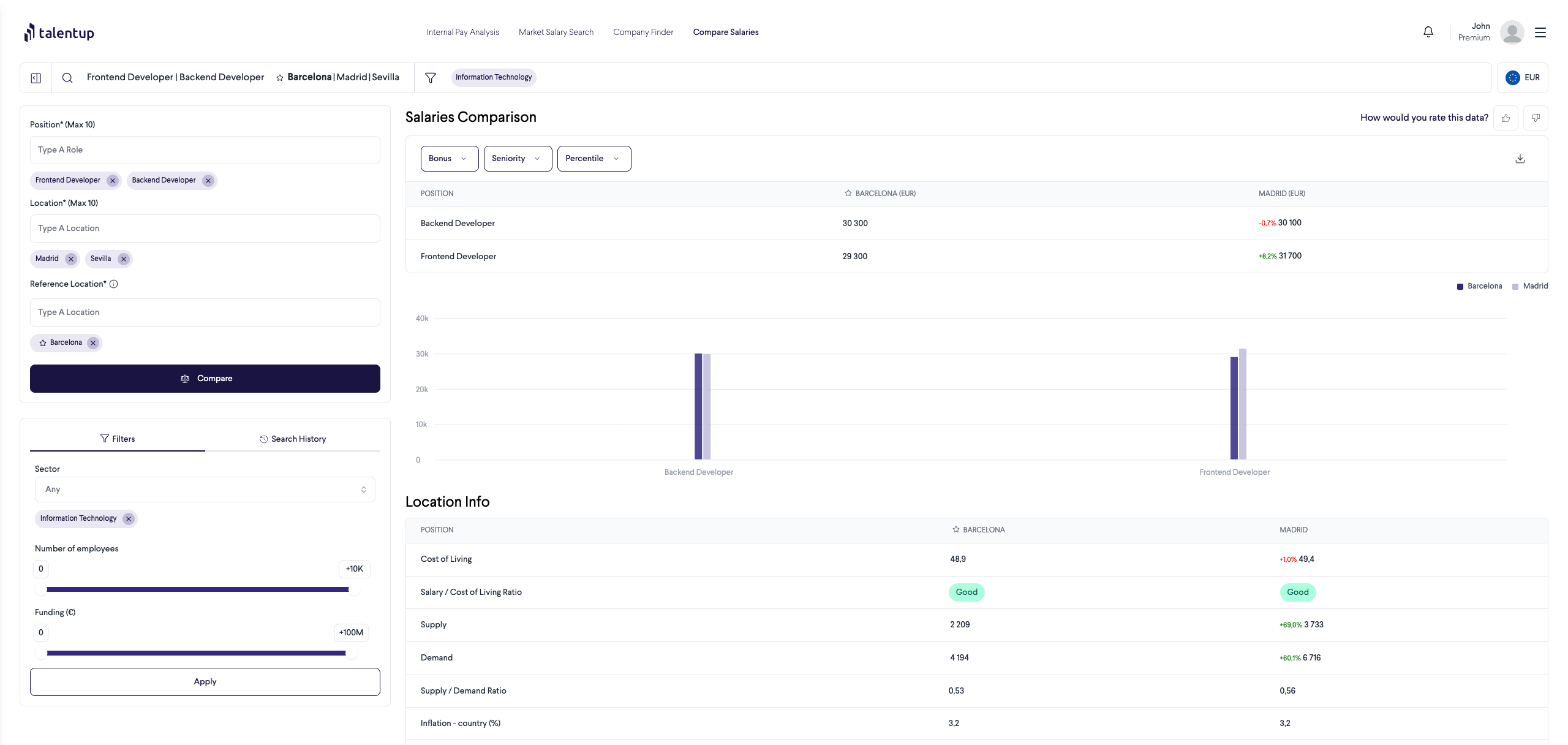
The Compare Salaries tool lets you run side-by-side salary comparisons across multiple roles and locations at the same time. Where the Market Salary Search focuses on a single role and location, Compare Salaries is built for strategic analysis: understanding how the same role is compensated across different cities, comparing pay for several different roles at once, or evaluating geographic pay differences when planning a new hire or a team expansion.
Compare up to 10 roles across up to 10 locations at once, anchored to a reference location of your choice.
How to Set Up a Comparison
Configure your comparison in the left-hand panel using three inputs:
Position(s): enter up to 10 job titles. Each appears as a column in the results matrix.
Location(s): enter up to 10 cities or countries. Each location is benchmarked for every position you entered.
Reference Location: set a baseline location to anchor the comparison. All other locations are shown relative to it, making geographic pay differences immediately visible.
Click Compare to generate the results.
Applying Filters
Refine your comparison using the same filters available in Market Salary Search. These apply across all roles and locations in the comparison for a consistent benchmark:
Filter
What it does
Sector
Focus on a specific industry (for example, Fintech or E-commerce)
Number of employees
Compare salaries within companies of a specific size range
Funding (€)
Target companies at a specific funding stage
Reading the Comparison Results
The results panel displays a matrix of roles versus locations. For each cell you see:
The median market salary for that role in that location
The percentage difference versus your reference location (for example, +15% or -8%)
The local currency of the benchmark
This matrix format makes it easy to spot where a role is most expensive to fill, where you can find cost-effective talent, or how pay varies across your company’s operating locations.
Search History
All previous comparisons are saved in the Search History panel on the right. Each entry shows the roles, locations, reference location, and active filters. Click any entry to reload the comparison instantly at no additional cost.
Common Use Cases
Global expansion planning: before deciding where to hire for a new team, compare what the target roles cost across your candidate markets to inform the business case
Relocation package design: when moving an employee to a new city, compare market salaries before and after to design a fair and defensible salary adjustment
Salary band calibration: compare pay across seniority levels (Junior, Mid, Senior) for the same role in multiple locations to build consistent salary bands that hold up across geographies
Remote work pay policy: if your team works remotely from different countries, use this tool to evaluate location-based versus role-based pay and set a policy grounded in market data
Multi-role benchmarking: benchmark several roles in a single session, useful when planning a new department or preparing for a team restructure
World’s leading Salary Benchmarking Solution
TalentUp helps companies handle salaries effectively by offering clear, compliant, and data-based information that allows teams to create successful pay strategies and follow transparency rules.